
Applications
IoT PCBA
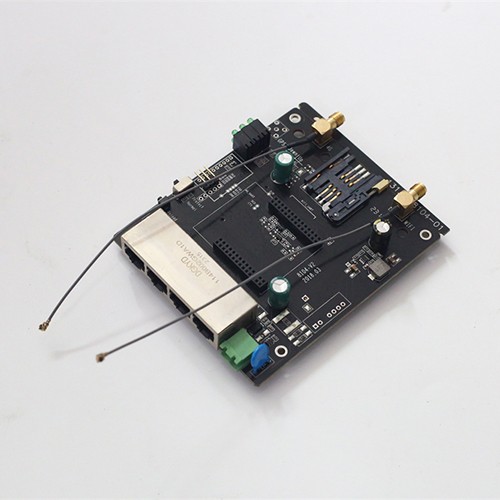
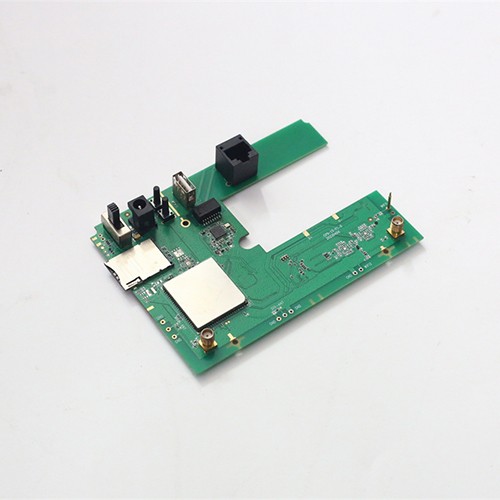
Four-port WIFI gateway

Four-port WIFI gateway

A four-port WIFI gateway is a device with multiple network interfaces and wireless functions, usually used to connect different types of networks and realize communication and data transmission between networks.
Product Details Why Kilandu

Quad-port WIFI gateway is a device with multiple network interfaces and wireless functions, usually used to connect different types of networks and realize communication and data transmission between networks.


< span style="-webkit-font-smoothing: antialiased; box-sizing: border-box; -webkit-tap-highlight-color: rgba(0, 0, 0, 0); font-weight: 600; color: initial; line-height: var(--md-box-samantha-normal-text-line-height); overflow-anchor: auto; font-size: 16px; font-family: arial, helvetica, sans-serif;">1. Function Features


  1. Multiple network port connection:
    • The four network interfaces can connect different network devices, such as computers, servers, printers, etc.

    • Supports multiple network protocols, such as Ethernet, TCP/IP, UDP, etc., to meet the needs of different devices network connection requirements.

  2. WIFI function:
    < ;/li>
    • < ;p>Built-in WIFI module can provide wireless network connection, making it convenient for mobile devices to access the network.

    • Support WIFI standards, such as 802.11b/g/n/ac , which can provide high-speed and stable wireless network connection.

  3. Network management:
    < ;/li>
    • < ;p>It can manage the connected network devices, such as IP address allocation, port mapping, flow control, etc.

    • Support network security features such as firewall, VPN, access Control, etc., can protect network security.

  4. Data transfer:
    < ;/li>
    • < ;p>It can realize data transmission between different networks, such as transmitting data from a LAN to a WAN, or transmitting data from a WAN to a LAN.

    • Support Data encryption and compression functions can improve the efficiency and security of data transmission.


2. Application scenarios


  1. Enterprise network:
    • It can be used as the core device of the enterprise network, connecting different departments and branches to achieve internal network communication and data transmission .

    • Support VPN function, which can realize remote office and mobile office and improve the work efficiency of the enterprise.

  2. Home network:
    < ;/li>
    • < ;p>It can be used as the central device of the home network, connecting the computers, mobile phones, tablets and other devices in the home to achieve network communication and data transmission within the home. ;

    • WIFI support Function, can provide wireless network connection, convenient for family members to use mobile devices to access the Internet.

  3. Public spaces:
    < /li>
    • < p>It can be used as a network device in public places, such as hotels, cafes, libraries, etc., to provide users with wireless network connections and network services.

    • Supports network management function, which can be connected Manage and control devices to improve network security and stability.


3. Selection points


  1. Performance:
    • Choose devices with stable performance and fast speed to meet the needs of different network applications.

    • Consider factors such as the device's processor performance, memory capacity, and network interface speed.

  2. Function:
    < /li>
    • < p>Choose devices with corresponding functions according to actual needs, such as WIFI function, network management function, data transmission function, etc.

      < ;/li>
    • Consider the scalability and compatibility of devices, This will allow for future upgrades and expansion of the network.

  3. Brand and quality:
    • Choosing well-known brands and reliable quality equipment can ensure the stability and reliability of the equipment.

    • Read user reviews and product reviews to learn about device performance and quality situation.

  4. Price:
    < /li>
    • < p>Choose reasonably priced equipment according to your budget. Don't just look at the price and ignore the performance and quality.

    • Compare the prices of different brands and models of equipment and choose the one with the best cost performance equipment.


In short, four network port WIFI The gateway is a powerful and widely used network device that can provide users with high-speed and stable network connection and data transmission services. When choosing a device, you need to choose a device with stable performance, complete functions and reliable brand according to actual needs and budget.


< /p>


Why Kilandu for turnkey PCBA and PCB

Turnkey, one factory

Gerber and BOM in, tested boards out: component sourcing, SMT, DIP, box-build and functional test under one roof in Shenzhen.

Production capacity

Line count, placement equipment and monthly capacity are documented on the factory capabilities page.

Quality system

Certificates, inspection stages and lot traceability are documented on the quality assurance page.

Markets and lead time

We supply OEM customers across Europe, Russia and the Americas; typical turnkey lead time is 2 to 5 weeks, depending on BOM complexity and component availability.

Frequently asked questions

What exactly does Kilandu deliver for a custom PCBA project?

A turnkey service: we source the full bill of materials, fabricate the PCB, run SMT and DIP assembly, and finish with AOI, inspection and functional testing, so you receive tested, ready-to-install boards from one factory.

Which quality standards is the factory certified for?

Production follows IPC-A-610 Class 2/3 workmanship under a certified quality system, with RoHS and REACH compliant processes. The certificates and what each one covers are listed on the quality assurance page.

Which markets do you serve and how fast can you deliver?

We supply OEM customers across Europe, Russia and the Americas from our factory in Shenzhen, China, with typical turnkey lead times of 2 to 5 weeks depending on BOM complexity and volume.